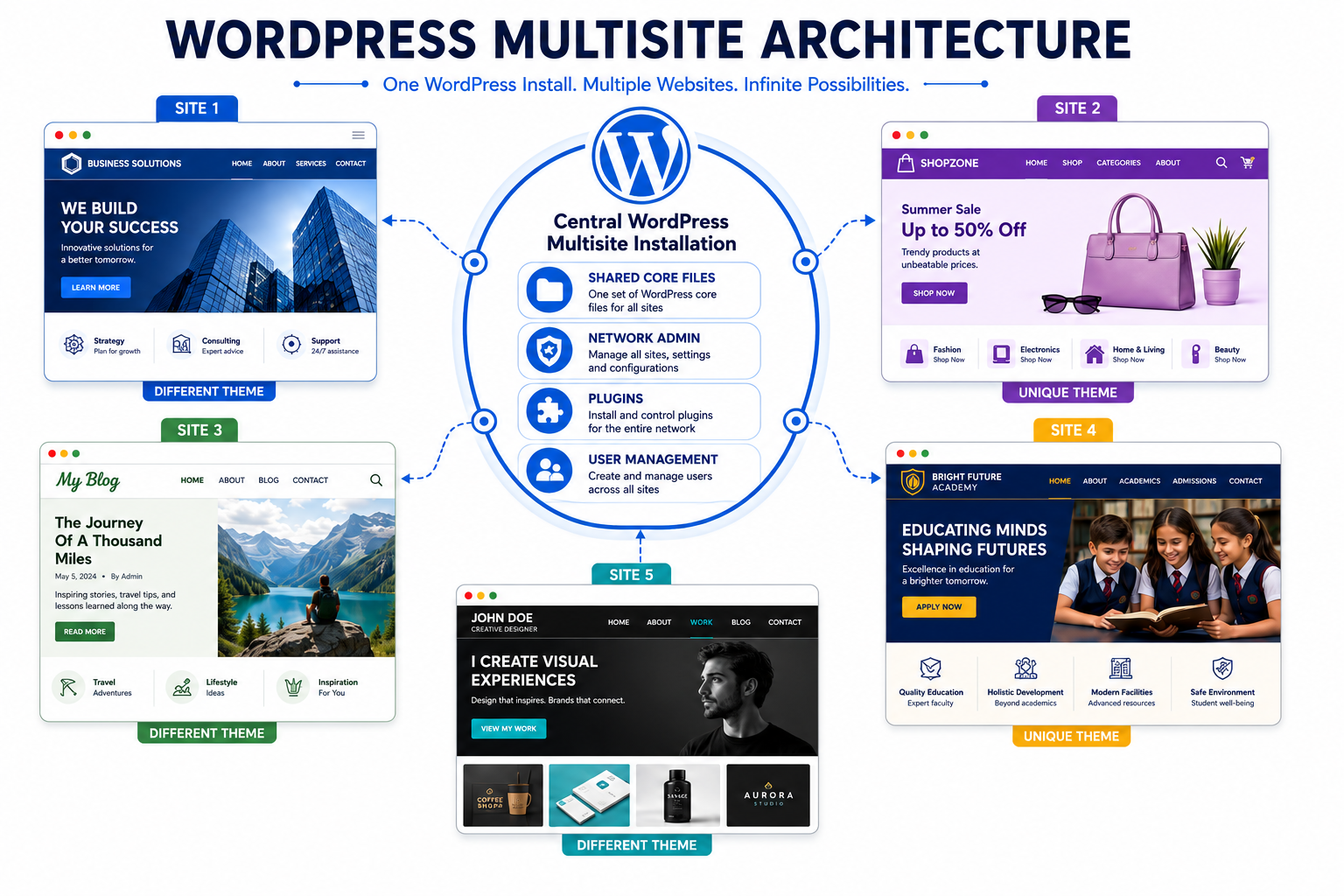
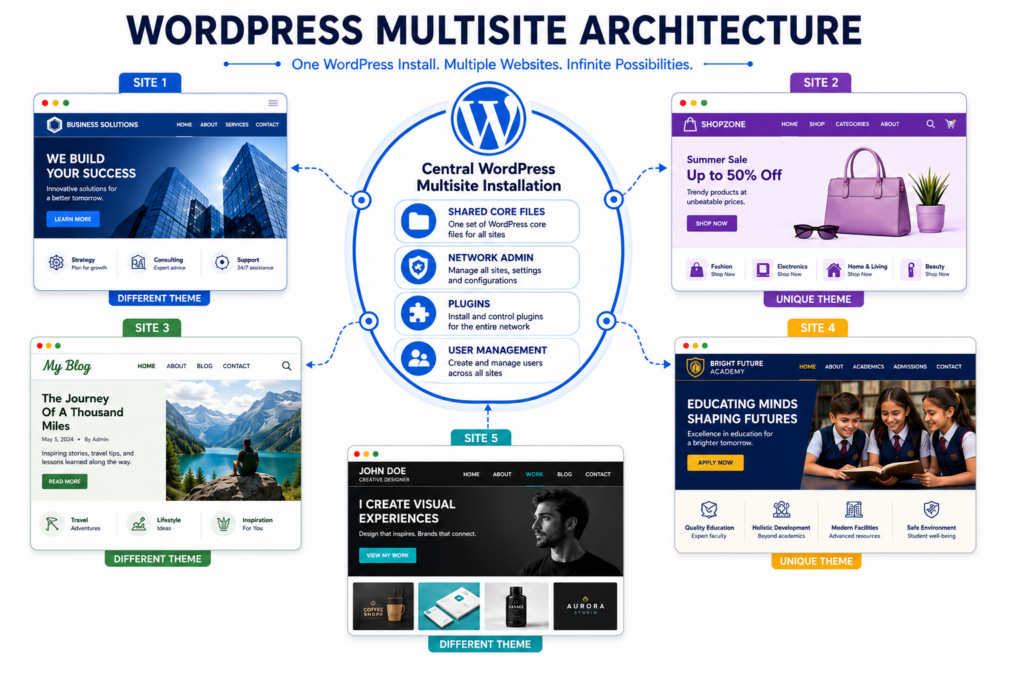
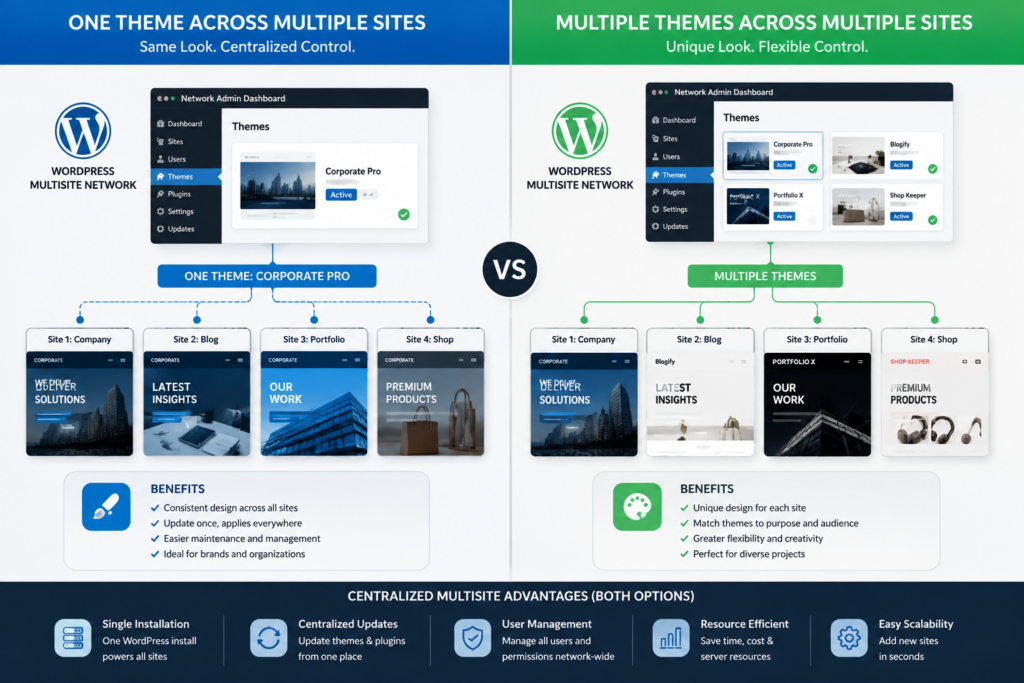
A WordPress Multisite network can contain multiple installed themes, and different sites within that network can use different themes. However, each site normally activates one theme at a time. The network administrator installs themes and decides which ones site administrators can access. One site may use a corporate theme, while another uses a separate design for a regional office, department, school, or franchise. The sites still share one WordPress installation, even though their active themes may differ.
Is WordPress Multisite one theme or multiple? The clearest answer is that the network can offer multiple themes, but each site chooses one active theme from the options allowed by the network administrator. This gives organizations central control without forcing every site to look identical. The final setup depends on whether the network needs consistent branding, independent designs, or a mixture of both.
How Theme Installation Works Across The Network
Theme installation happens at the network level rather than separately inside every site dashboard. The Super Admin opens Network Admin, installs the required themes, and controls their availability. Regular site administrators cannot install new themes on their own. This structure prevents every site owner from adding unapproved files that could create security, compatibility, or maintenance problems. It also gives the organization one central location for updating and reviewing theme files.
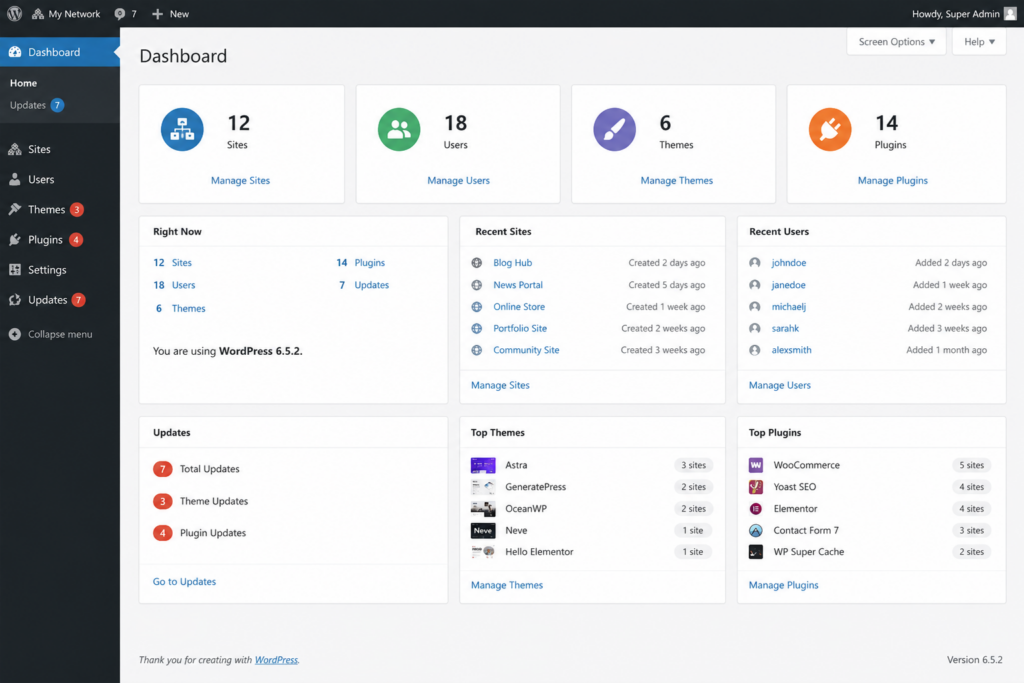
Installing a theme does not automatically make it active on every site. The network administrator can enable a theme for the network, which allows individual site administrators to activate it. A network may therefore contain several installed themes while only making selected options available. Official WordPress Multisite administration documentation explains that site administrators have fewer theme and plugin capabilities than network administrators. This control is one of the main reasons larger organizations choose Multisite.
Each Site Normally Activates One Theme At A Time
Every site in a Multisite network functions as its own site for content, settings, users, and appearance. A site administrator can activate one available theme for that site. Another site in the same network can activate a different theme. For example, a university network might use one theme for the main institution, another for academic departments, and a third for student organizations. Each site keeps its own active design while sharing the WordPress core installation.
The phrase multiple themes can create confusion because it may suggest that one site displays several active themes at once. WordPress does not normally work that way. A single site uses one active theme, although plugins, templates, patterns, and custom code can create different page layouts within that theme. Businesses planning a controlled network often use professional WordPress Website Design to create a flexible theme system that supports variety without losing brand consistency.
Network Enabling Does Not Force Every Site To Switch
When the Super Admin network-enables a theme, the action makes that theme available for use. It does not automatically activate the design across every site. Existing sites can continue using their current themes unless an administrator changes them. This distinction allows network managers to introduce a new approved option without disrupting the appearance of active websites.
The administrator can also keep certain themes unavailable when they do not meet the network’s needs. Older themes may lack current security updates, accessibility support, or compatibility with the latest WordPress features. Restricting access helps the organization maintain stronger standards across the network. Before enabling a new theme, administrators should test navigation, templates, forms, plugins, mobile layouts, and performance on a staging site. Central control works best when it includes a clear review process instead of simply adding every available theme.
Using One Shared Theme Can Improve Brand Consistency
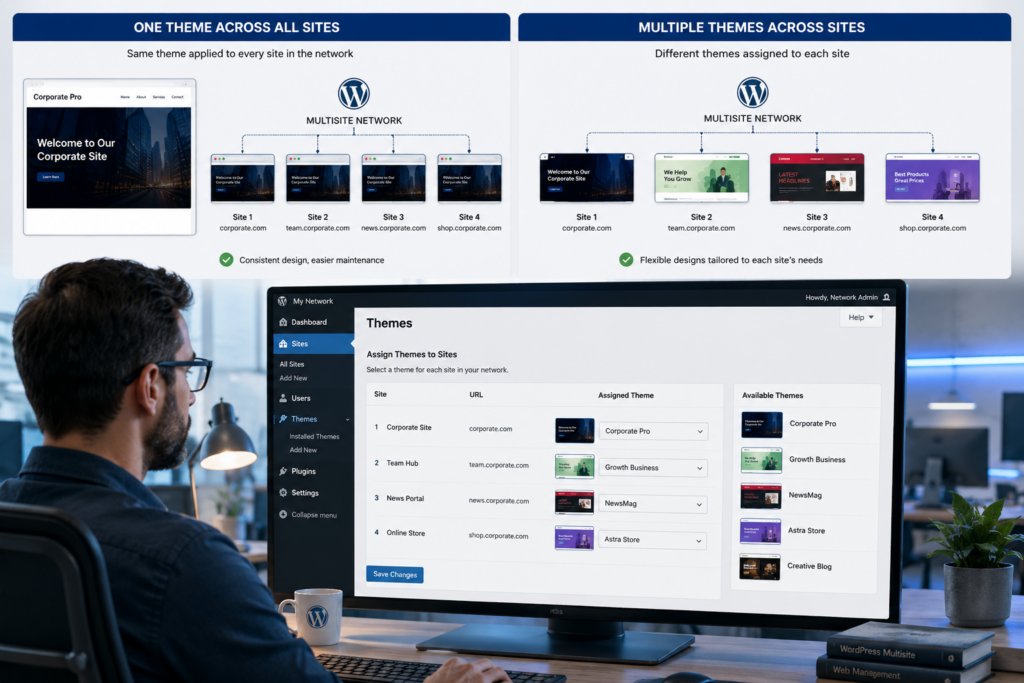
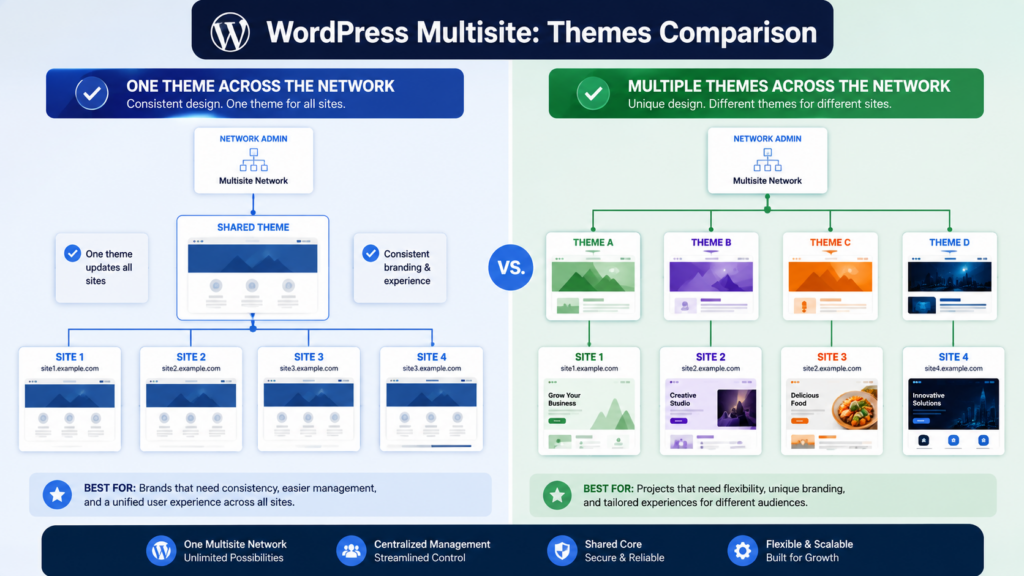
Some networks choose one theme for every site because consistent branding matters more than visual independence. Franchises, corporate departments, school districts, and government organizations often need shared colors, typography, navigation, and page structures. A common theme helps visitors recognize that each site belongs to the same organization. It also simplifies training because employees use similar editing tools and layouts across the network.
A shared theme does not require every site to contain identical pages. Each site can maintain its own content, menus, images, and settings while following the same design system. Theme options, templates, and block patterns can provide controlled flexibility. This approach also reduces maintenance because developers test and update one primary theme instead of supporting several unrelated designs. It can become limiting, however, when sites serve very different audiences or require specialized features. The network should choose consistency only when it supports the users and the organization’s wider goals.
When Multiple Themes Make More Sense
Some Multisite networks benefit from allowing different themes across different sites. Universities often manage separate sites for colleges, research centers, athletic departments, and student organizations. Franchise businesses may operate local websites with regional branding while maintaining central administration. Agencies can host several client websites under one installation while allowing each client to use a unique design. In these situations, multiple approved themes provide flexibility without requiring separate WordPress installations for every website.
Even when different themes are allowed, administrators should avoid installing unnecessary options. Every additional theme increases the maintenance workload because updates, compatibility, and security must be monitored. Choosing a small collection of well-supported themes makes the network easier to manage while still providing enough variety for different websites.
Child Themes Provide Safe Customization
Many organizations use child themes instead of modifying the parent theme directly. A child theme inherits the functionality of the parent while allowing developers to customize templates, styling, and other design elements without changing the original files. This approach makes future updates much easier because changes to the parent theme do not overwrite custom work. Child themes are especially valuable when several sites require slightly different branding while sharing the same overall framework.
For example, each regional office may use identical page layouts but different logos, colors, or banner images. Instead of maintaining several unrelated themes, developers can create child themes that preserve consistency while supporting local customization. This reduces long-term maintenance and makes network-wide updates more predictable.
Plugins And Themes Serve Different Purposes
People sometimes confuse themes with plugins when planning a Multisite network. Themes control the visual appearance and layout of a website, while plugins add functionality such as forms, e-commerce, memberships, booking systems, or search engine optimization. A site can activate one theme while using multiple plugins. The network administrator also controls which plugins are available across the network, although plugin management follows different rules than theme activation.
Separating these responsibilities makes planning easier. A business should first decide how every website should look, then determine what features each site requires. This prevents unnecessary complexity while ensuring that the visual design and technical functionality remain organized. Understanding this distinction helps administrators make better decisions when expanding the network.
Maintaining Themes Across A Multisite Network
Regular maintenance becomes increasingly important as a Multisite network grows. Every installed theme should receive updates promptly to maintain compatibility with the latest WordPress version and reduce potential security risks. Administrators should also remove unused themes that are no longer needed because outdated software increases maintenance requirements and may introduce vulnerabilities over time.
Businesses managing larger networks often combine structured theme management with professional Website Maintenance to monitor updates, backups, performance, and security across every site. According to the official WordPress Documentation, keeping WordPress core, themes, and plugins updated is an important part of maintaining a secure and reliable website. Consistent maintenance helps ensure every site remains stable while reducing compatibility problems after updates.
Conclusion
Is WordPress Multisite one theme or multiple? A Multisite network can contain multiple installed themes, but each website normally activates one theme at a time. The Super Admin installs and manages available themes, while individual site administrators choose from the approved options if permission has been granted. This structure gives organizations centralized control while allowing flexibility where appropriate.
The right approach depends on the organization’s goals. Businesses seeking consistent branding may prefer a shared theme across every site, while universities, franchises, agencies, and large organizations often benefit from several approved themes or carefully designed child themes. Companies planning or expanding a WordPress Multisite network often work with Best Website Builder Group to create scalable websites that balance flexibility, security, and long-term maintainability.