A great web page combines a clear purpose, engaging headlines, useful content, attractive visuals, and a straightforward call to action. Every element should help visitors understand the information and decide what to do next. Understanding what makes a great web page also requires attention to readability, search engine optimization, accessibility, and user experience. A successful page balances attractive design with practical functionality.
A homepage, product page, blog post, and landing page may look different, but each needs an organized structure. Visitors should find relevant information without unnecessary distractions. The following sections explain how to create individual web pages that communicate effectively and support measurable results.
What Makes A Great Web Page Effective
Every successful web page needs a specific objective. A service page may encourage appointment bookings, while a product page focuses on purchases. Similarly, an informational article should answer visitors’ questions and guide them toward related resources. Defining the primary goal helps determine which content and features deserve attention.
Start by identifying the intended audience and its expectations. Then, organize the page around the information visitors need most. Avoid including unrelated sections simply to fill space. For example, a plumbing service page should explain the service, highlight relevant benefits, and provide an inquiry option. Its design should support these actions rather than distract from them.
An effective page also makes its purpose obvious. Visitors should not need to scroll through several sections to understand what the page offers. Use a clear introduction and relevant supporting information near the top. This approach creates a logical starting point for the rest of the content.
Attention-Grabbing Headlines And Introductions
The main headline is often the first content visitors notice. It should explain the page’s subject clearly and communicate why the information matters. Avoid vague statements that sound impressive but provide little meaning. A specific headline helps visitors confirm that they have reached the right page.
For example, a heading such as “Professional Kitchen Remodeling Services” communicates more than “Transform Your Dreams.” The first identifies the service immediately, while the second requires additional explanation. Supporting text can then introduce the benefits, service details, or solutions available.
The introduction should expand on the headline without becoming unnecessarily long. Explain the main topic within the opening sentences and provide a reason to continue reading. For a service page, this might involve identifying common customer needs. For an educational article, the introduction should answer the main question before exploring supporting details.
Headlines and introductions also contribute to search visibility. Include relevant terms naturally and ensure the content matches visitor expectations. However, avoid repeating keywords simply to increase their frequency. Clear, informative writing provides greater value than excessive optimization.
Readable Content And Effective Visual Hierarchy
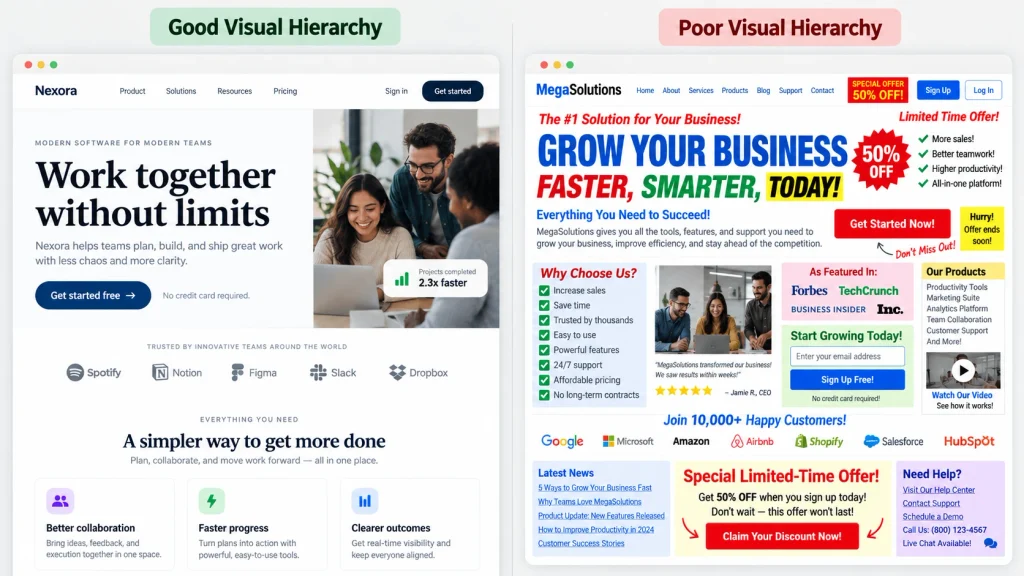
Visual hierarchy determines which elements attract attention first. A well-designed page uses heading sizes, spacing, contrast, and positioning to organize information. The most important message should stand out, while supporting details remain easy to follow. Consistent formatting helps visitors scan the content and locate relevant sections.
Readability is another factor in what makes a great web page. Use concise sentences, descriptive subheadings, and manageable paragraphs. Avoid presenting large blocks of text without visual separation. Sufficient white space helps distinguish different sections and prevents the layout from appearing overcrowded.
The following table compares common page design problems with practical improvements.
| Page Element | Poor Approach | Better Approach |
|---|---|---|
| Headlines | Vague or confusing text | Clear, descriptive headings |
| Paragraphs | Long, crowded text blocks | Short, organized paragraphs |
| Typography | Multiple unrelated fonts | Consistent, readable fonts |
| Spacing | Elements placed too closely | Balanced white space |
| Buttons | Unclear action labels | Specific calls to action |
| Images | Unrelated decorative visuals | Relevant supporting images |
Content order also matters. Present essential information before secondary details, especially on pages designed to generate inquiries or sales. For example, a service page can introduce the offering before discussing benefits and customer testimonials. Maintain a logical heading hierarchy so visitors and assistive technologies can understand the content structure. A strong visual arrangement should make important information easier to find without sacrificing accessibility.
Strategic Use Of Images And Supporting Graphics
Images can make web pages more engaging and help explain information quickly. Product photography, project images, diagrams, and screenshots provide visual context that written content may not communicate as effectively. However, every image should serve a useful purpose. Adding unnecessary graphics can increase loading times and distract visitors. Choose photographs that accurately represent the subject. A construction company might display completed projects, while an ecommerce store needs clear product images from useful angles. Informational pages may benefit from diagrams that explain processes or illustrate comparisons.
Image placement should support the surrounding content. For example, a product image belongs near its description and purchasing information. An infographic explaining a process should appear beside the relevant instructions. This arrangement connects visual details with the written explanation. Technical optimization is equally important. Resize oversized images, use appropriate file formats, and compress files without noticeably reducing quality. Add descriptive alternative text when images communicate meaningful information. These practices improve accessibility and reduce unnecessary page weight.
Consistent image styling also strengthens the overall appearance. Maintain appropriate aspect ratios, avoid distorted photographs, and use similar visual treatments across related sections. A thoughtful combination of images and text creates a more balanced page.
Well-Placed Calls To Action
A call to action encourages visitors to complete a specific task. Common examples include requesting a quote, purchasing a product, booking an appointment, or contacting a company. Effective buttons use clear language and appear where visitors naturally expect the next step.
For example, a service page might display “Request A Free Estimate” after explaining the service benefits. An ecommerce product page could place an “Add To Cart” button near the price and product options. These placements connect the requested action with information that supports the visitor’s decision.
What makes a great web page successful often depends on reducing unnecessary steps between visitor interest and action. Avoid displaying several competing buttons with equal visual emphasis. Instead, identify one primary action and use secondary links when appropriate.
Button appearance matters as well. Select colors that stand out from surrounding elements while remaining consistent with the website’s branding. Make buttons large enough for comfortable interaction on mobile devices. Finally, test whether your calls to action work correctly. Broken links, complicated forms, and confusing checkout processes can prevent visitors from completing their intended tasks. Clear actions create a smoother experience and help businesses measure meaningful results.
Trust Signals And Supporting Information
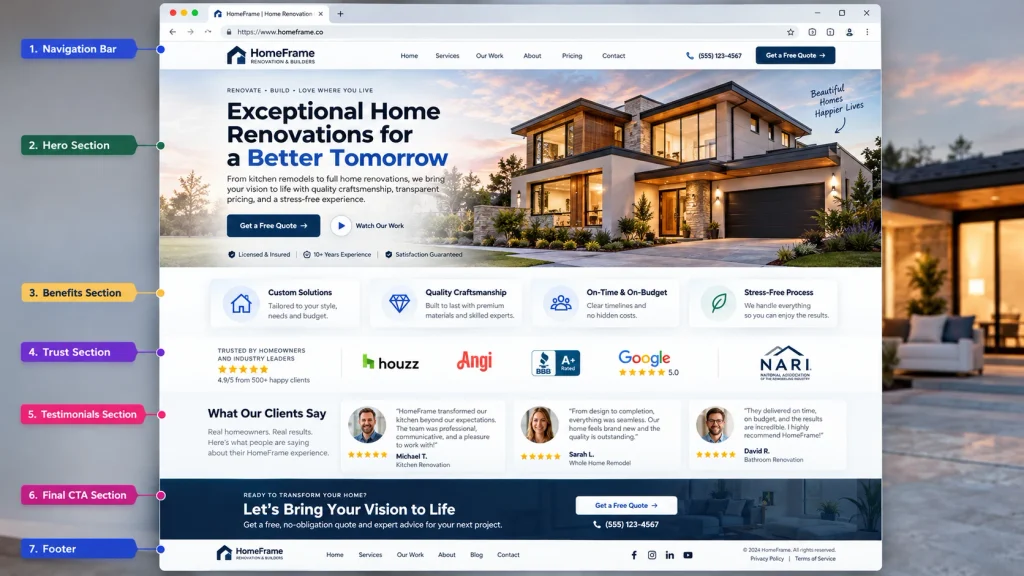
Visitors often evaluate a business before contacting it or making a purchase. Trust signals provide supporting information that helps them judge credibility. These may include authentic testimonials, customer reviews, professional qualifications, completed projects, and clear company details.
For example, a contractor’s service page could display photographs of previous work alongside customer feedback. An online store might include transparent shipping information, return policies, and detailed product specifications. Such information helps visitors make decisions without searching across multiple pages.
Avoid adding unsupported claims or fabricated testimonials. Trust depends on accurate information, and misleading statements can damage credibility. Display relevant evidence near the content it supports rather than placing every trust element in one crowded section. Contact information also contributes to confidence. Depending on the business, this may include a phone number, contact form, business address, or customer support details. Make these options easy to locate.
A professional layout further supports credibility. Inconsistent formatting, broken images, spelling mistakes, and outdated information can create doubts about reliability. Regular content reviews help prevent these problems. Professional web design services can help businesses organize supporting information, customer-focused content, and calls to action within a consistent page layout.
On-Page SEO And Internal Linking
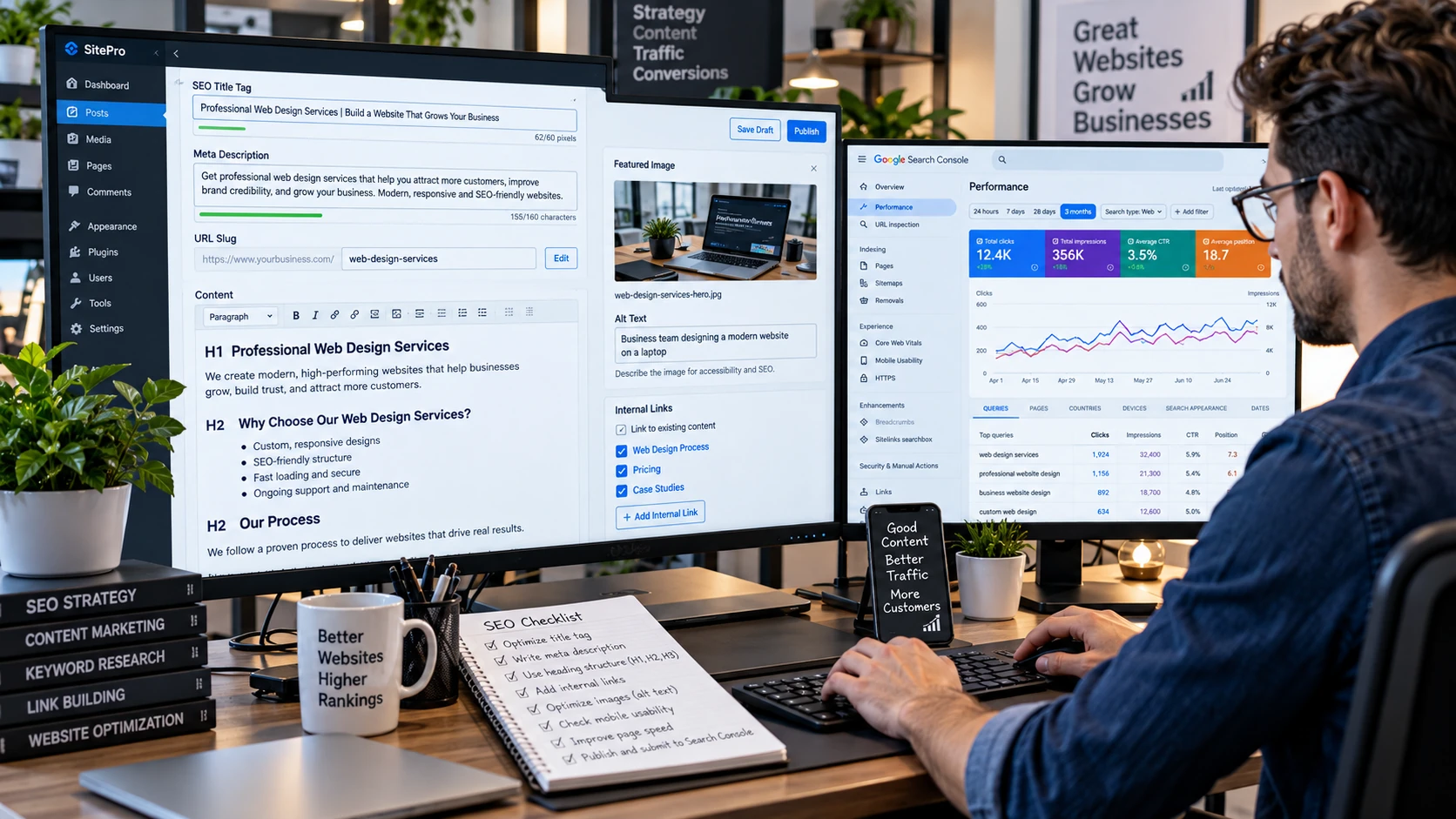
Search engine optimization helps individual web pages communicate their subject to search engines. Effective on-page SEO starts with identifying the main search intent and creating content that addresses it directly. Relevant headings, descriptive titles, and well-organized information support this process.
When evaluating what makes a great web page, search visibility should complement usability rather than dominate the design. Include the primary keyword naturally in the title, introduction, and relevant sections. However, avoid repeating the exact phrase in every paragraph. Write a unique meta description that accurately summarizes the page. Use a short, descriptive URL and ensure important content remains accessible to search engines. Informative images should also include suitable alternative text.
Internal links help visitors discover related information without returning to the main navigation. For example, an article about website design might link to a relevant service page. These connections establish relationships between content and support navigation. Heading structure matters for accessibility as well. Google’s content structure guidance explains how meaningful HTML headings organize information and help users navigate page content.
Businesses can also use professional SEO services to improve content relevance, technical performance, and search visibility. The goal is to attract relevant visitors while providing the information they expect.
Measuring Page Performance And Improving Results
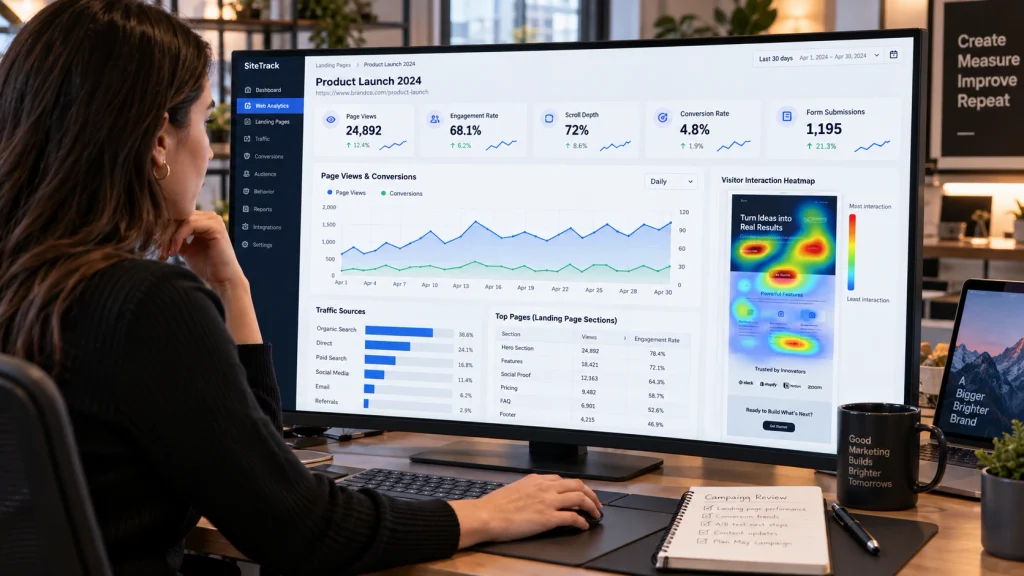
Publishing a web page is only the beginning. Reviewing its performance helps identify whether the content and layout achieve their intended goals. Useful measurements depend on the page’s purpose, so avoid evaluating every page using the same criteria. A service page might prioritize inquiries, while an ecommerce product page focuses on purchases. Informational articles may benefit from engagement measurements and visits to related content. Select metrics that reflect the actual objective.
Analytics tools can provide information about page visits, user engagement, and conversion activity. Website owners can also examine scroll depth, button interactions, and form submissions when appropriate tracking exists. Regular testing reveals what makes a great web page more effective for its audience. If visitors repeatedly leave before reaching important information, consider adjusting the content order. If a contact form receives little engagement, examine its placement and complexity.
You can also test different headlines, button labels, and page layouts. Change one major element at a time when possible, then compare results using sufficient data. Small datasets may produce misleading conclusions, so avoid treating every short-term difference as meaningful. Continue reviewing mobile usability, page speed, broken links, and content accuracy. Visitor expectations and business requirements change over time. A useful page should evolve alongside those needs.

Conclusion
Understanding what makes a great web page involves combining clear communication with effective design. Strong pages have a defined purpose, engaging headlines, readable content, relevant images, and straightforward calls to action. Trust signals, accessibility, and search engine optimization further improve the visitor experience. However, these elements must work together rather than compete for attention.
Regular performance reviews help identify opportunities to improve content, layout, and functionality. A successful web page should remain easy to use while helping visitors accomplish their goals. At Best Website Builder Group, businesses can access professional website design, development, and SEO solutions. These services help create engaging web pages that support customer inquiries, conversions, and long-term website performance.