
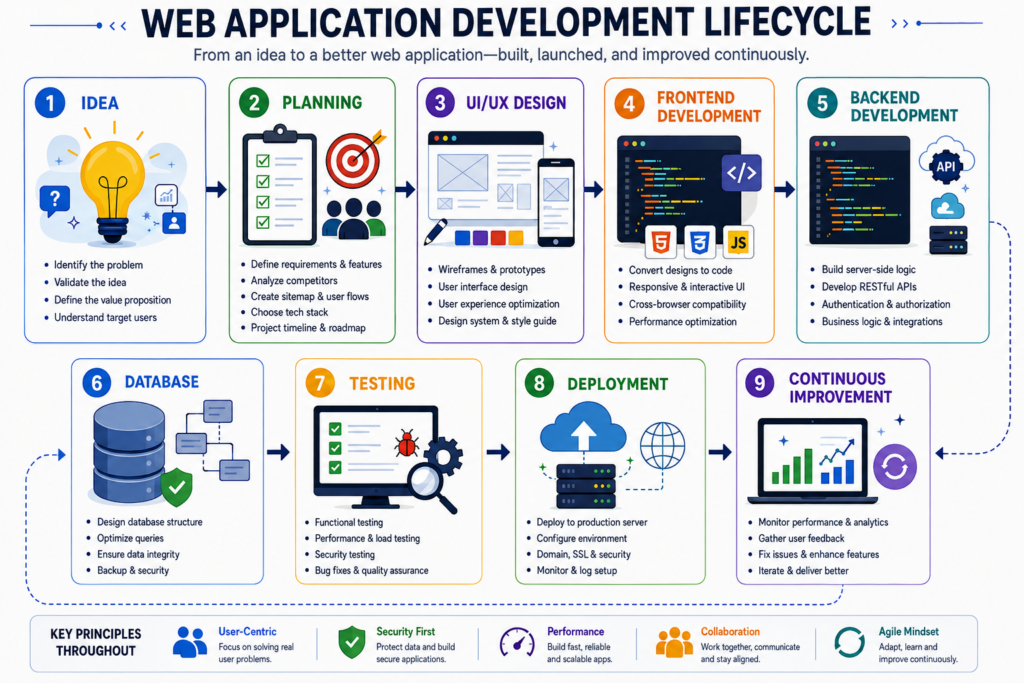
A successful web application begins with a specific problem, not with code. How to build a web application starts by defining what users need to accomplish and why the current process falls short. The application may help customers book services, manage accounts, submit documents, track orders, collaborate with teams, or access personalized information. A clear goal keeps the project focused and prevents unnecessary features from increasing cost and complexity.
Before choosing a framework or hiring developers, describe the main user, the task they need to complete, and the result the application should deliver. This early planning stage shapes every later decision, including design, technology, security, and budget. A strong web application does not try to solve every possible problem. It solves one important problem well, then expands as real user needs become clearer.

Define The Users And Core Features
Every application should serve a clearly defined audience. A customer portal has different requirements from an internal project management system. An e-commerce dashboard serves different users than a healthcare scheduling platform. Start by identifying who will use the application and what each user needs to do. Customers may need to register, log in, make payments, update profiles, or download documents. Employees may need dashboards, reports, approval tools, or access controls. Administrators may need user management, settings, and performance data. Once the main user groups are clear, create a short list of essential features.
Focus on the functions required for the first working version rather than adding every possible idea. This approach helps control development time and gives users something valuable sooner. Later updates can add advanced features based on real feedback instead of assumptions.
Map The User Journey Before Designing Screens
A user journey shows how people move through the application from their first action to their final goal. Mapping this journey helps teams identify each screen, decision, and interaction before development begins. For example, a booking application may guide users from service selection to date choice, account details, payment, and confirmation. If the flow contains unnecessary steps, users may leave before finishing. A simple journey reduces confusion and makes the application easier to use.
Teams often create wireframes at this stage to show page layouts without focusing on colors or visual details. Wireframes reveal where navigation, forms, buttons, and information should appear. They also help developers estimate the work more accurately. Businesses that need to improve an existing digital experience may use a professional Website Redesign process to simplify user journeys before adding advanced application features.
Choose The Right Technology Stack
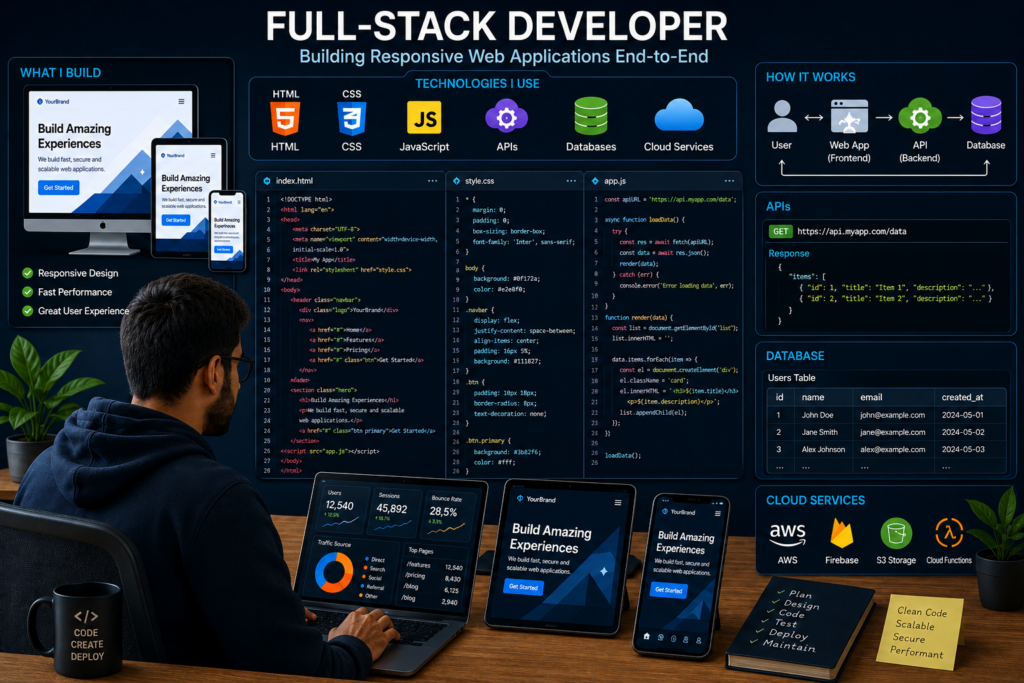
The technology stack includes the programming languages, frameworks, databases, and hosting services used to build the application. The right choice depends on the application’s size, features, security needs, expected traffic, and future growth. Front-end technologies control what users see and interact with. HTML, CSS, and JavaScript form the foundation, while frameworks such as React, Vue, and Angular support more complex interfaces. Back-end technologies manage data, authentication, business rules, and server requests.
Developers may choose Node.js, Python, PHP, Java, or C# based on project requirements and team experience. Databases such as PostgreSQL, MySQL, or MongoDB store user records and application data. The most popular technology is not always the best choice. A dependable stack should match the project, remain maintainable, and support future expansion without creating unnecessary complexity.
Create A Minimum Viable Product First
Building every planned feature before launch can delay the project and increase risk. A minimum viable product, often called an MVP, includes only the core features needed to solve the main user problem. This version allows a business to test the idea with real users before investing in a larger system. If the application helps customers request estimates, the MVP may include account creation, a request form, file upload, and confirmation. Advanced reporting, messaging, and automation can come later. Learning how to build a web application through an MVP approach helps teams discover what users actually value.
Feedback may reveal that some planned features are unnecessary while other needs deserve more attention. Launching a focused version first reduces wasted development, supports faster improvement, and creates a stronger foundation for future releases.

Design The Database And Application Architecture
A strong architecture determines how the application stores information, handles requests, and supports future features. Developers should map the relationship between users, records, payments, files, messages, and other data before building the database. Clear data relationships reduce duplicate information and make reporting more reliable. The architecture should also separate the user interface, business logic, and data layer. This separation makes the code easier to maintain and test. It also allows teams to update one part of the application without disrupting the entire system.
Scalability matters from the beginning, even when the first release serves a small audience. The application should handle more users, larger datasets, and additional features without requiring a complete rebuild. A simple but flexible architecture usually performs better than an overly complex system. Teams learning how to build a web application should avoid unnecessary tools that increase maintenance without adding clear value. Good architecture supports performance, security, and long-term development.
Build Security Into Every Stage Of Development
Security should guide development from the first design decision through launch and ongoing maintenance. Web applications often store passwords, customer details, payment records, and confidential business information. Developers should use encrypted connections, secure authentication, role-based access, input validation, and protected database queries. These controls reduce the risk of unauthorized access and common attacks. Teams should also limit each user to the information and functions required for their role. An employee should not receive administrator-level access unless the job requires it.
Regular testing helps identify weaknesses before attackers can exploit them. The Cybersecurity and Infrastructure Security Agency encourages organizations to build security into products from the start rather than treating it as a later addition. This approach lowers risk and prevents expensive fixes after launch. Businesses should also create backup and recovery plans so they can restore the application quickly if an incident occurs.
Develop And Test The Core Features
Development usually begins with the most important user journey. Teams build one feature at a time, connect it to the database, and test how it behaves under different conditions. This method makes problems easier to identify and prevents small errors from spreading across the project. Developers should test successful actions as well as failed attempts. Forms need clear error messages, login systems need secure recovery options, and payment processes need confirmation steps. Every feature should work across common browsers and screen sizes before release.
Testing should include real users whenever possible. Developers know how the system should work, but customers often use it in unexpected ways. User testing reveals confusing instructions, hidden navigation problems, and unnecessary steps. These insights improve the application before a wider launch. A careful testing process is essential when learning how to build a web application because reliable software depends on more than functional code. It must also feel clear, fast, and predictable to the people using it.
Launch The Application In A Controlled Way
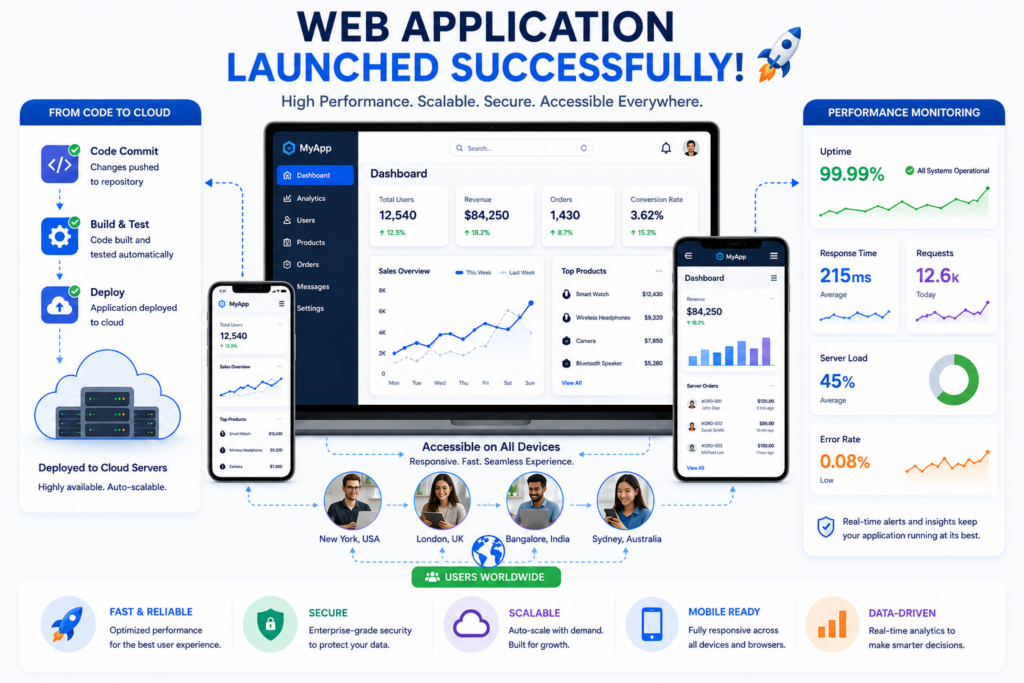
A controlled launch reduces risk and gives the team time to respond to real-world issues. Instead of opening the application to every user at once, many businesses begin with a small test group. This group can include employees, trusted customers, or selected partners. Their activity helps the team evaluate performance, identify errors, and confirm that the application supports actual business processes. Developers can review server logs, user behavior, support requests, and completion rates during this period.
Before the full launch, the team should verify domain settings, backups, analytics, email delivery, security certificates, and access permissions. They should also prepare support documentation for users and internal staff. Learning how to build a web application includes planning for what happens after the code reaches production. A successful launch depends on communication, monitoring, and fast problem resolution. Gradual deployment helps protect the user experience while giving the team useful data for final improvements.
Maintain And Improve The Application After Launch
Launching the first version marks the beginning of ongoing development rather than the end. Browsers change, security threats evolve, and users request new features. Regular maintenance keeps the application stable, fast, and secure. Teams should monitor errors, review performance, update dependencies, test backups, and remove outdated code. They should also examine how users move through the application. If visitors abandon a process at the same step, the interface may need improvement.
Businesses often support this work through professional Website Maintenance to keep systems secure and dependable as requirements change. User feedback should guide future updates, but each new feature needs a clear purpose. Adding too much functionality can make the application harder to use. The strongest products improve gradually through evidence, testing, and careful prioritization. Long-term success comes from treating the application as an active business system that needs consistent attention.
Conclusion
How to build a web application involves defining a clear problem, mapping the user journey, choosing suitable technology, creating an MVP, designing secure architecture, testing every feature, and planning ongoing improvements. The coding matters, but the quality of the planning often determines whether the final product solves the right problem. A focused application gives users a clear path to complete important tasks while helping the business reduce manual work and improve service.
The best applications continue evolving after launch because real users reveal opportunities that planning alone cannot predict. Businesses that begin with a strong foundation can add automation, integrations, reporting, and advanced features without losing reliability. Companies ready to turn a business process into secure, scalable software often work with Best Website Builder Group to create digital platforms that support long-term growth and better customer experiences.